
LPG diagnostic interfaces are essential for checking and adjusting LPG installations. On AutoGasHub.com, you can find interfaces compatible with almost all LPG installation brands, such as Tomasetto, Stag, Landi Renzo, BRC, OMVL, Milano, Fratelli, AG Compact, LPG Tech, KME, Romano, Prins, Lovato, and more. Proper installation of an interface requires installing the FTDI driver and the diagnostic software specific to the LPG ECU. Discover the ideal solutions for monitoring and optimizing your LPG system!
With every LPG diagnostic interface purchased from our website, you receive a free DVD with software and drivers (or a USB stick for an additional cost).
LPG Interface Installation Guide
For interfaces with multiple adapters (you can choose between adapter numbers 1 to 12 depending on the brand - the compatibility list of adapters is available in the LPG interface description), carefully select the correct adapter for your installation. If the wrong adapter is selected, the interface will not connect to the LPG ECU, and there is a risk of damaging the interface.
1. The first step is installing the driver. This must be installed before connecting the interface to a PC or laptop.
The driver can be found on the DVD or USB stick in the 'DRIVER FTDI' folder -> cdm20830_setup (recommended). Double-click to install.
Once the driver is installed, connect the LPG diagnostic interface to the laptop or PC via a USB port.
To check if the driver has been correctly installed, open Windows Device Manager -> Ports (COM & LPT).
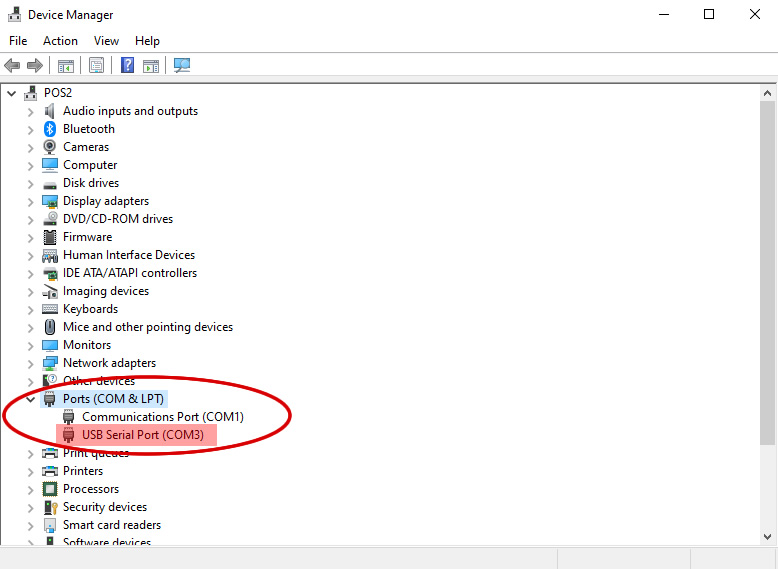
If everything is installed correctly, the interface will appear under Ports (COM & LPT) -> USB Serial Port (COM_) - the COM should be followed by a number (1,2,3, etc.), indicating the port the interface is communicating on.
Step 2: Installing the LPG Diagnostic Software
LPG installations do not have a universal diagnostic software for all brands (unlike Bosch or Delphi multi-brand auto testers). Since there is no multi-brand software, you must select the software based on the LPG ECU brand and model. For example, for Stag (Tomasetto) ECUs, there are multiple diagnostic software options, each compatible with a specific LPG ECU model. If the correct software is not selected, the connection will not be established, and diagnosis will not be possible. All diagnostic software we offer is original, developed by LPG installation manufacturers. We do not offer aftermarket software.
On the DVD (or USB stick) that comes with the interface, you will find folders grouped by adapters and brands (e.g., 'ADAPTOR 3' folder with a Landi Renzo subfolder or 'ADAPTOR 7' folder with a Tomasetto subfolder), depending on the interface type purchased. Each folder contains one or more types of software for different LPG ECU models. The folders also include guides for correct software selection in PDF, text, or image format.
Some software versions are archived. You will need an extraction tool such as WinRAR or WinZip.
After extracting the LPG software, double-click to install and follow the steps. Once installed, a shortcut icon will appear on the desktop.
At this point, the interface is ready for use.
To perform a diagnosis, the interface must be connected to the vehicle, and the engine must be running.
For certain factory-installed LPG systems, such as the Landi Renzo system on Dacia, some parameters cannot be viewed or modified.
Most Common Connection Errors:
Incorrect driver installation (the driver must be installed before connecting the LPG interface to the laptop or PC).
Incorrect diagnostic software selection (try a different software version, either older or newer).
Incorrect adapter selection (verify adapter compatibility with your installation).
Incorrect communication port settings (go to Device Manager -> Ports (COM & LPT) -> USB Serial Port (COM_) and ensure the port matches the one set in the LPG diagnostic software).
Incorrect LPG interface connection (verify the interface is correctly plugged into the vehicle's LPG system - some LPG installations have multiple identical connectors, but not all are for diagnostics; ensure the interface is fully connected).
"The LPG installation connector has 4 wires, but the interface connector has 3 wires" (this is not a defect; some LPG interfaces are powered by the vehicle's electrical system, while ours is powered via USB, so it has one less wire. This does not affect proper operation).
"I installed all the software, but it still doesn't connect" - LPG diagnostic software is constantly updated, so the DVD provided may not have the latest version. Most LPG software can be found on manufacturer websites. Simply search on Google, e.g., 'lpg tech software download'.
List of Websites with Software Downloads:
AC Stag Tomasetto LPG Software - [Manufacturer Link]